
Aviators make specific and crucial calculations before, during, and after flights, and they often use an E6-B flight computer to make these calculations easier. In this series, we’ll focus on how to use an E6-B, a mechanical, nonelectronic flight computer. This aviation slide rule uses rotating logarithmic scales to perform mathematical and navigational calculations. As an analog navigation tool, an E6-B assists with calculations that would otherwise require multiplication, division, trigonometry, unit conversions, and vector math, and compresses all of this into a slide-rule system.
An E6-B flight computer has two main parts: (1) a circular slide rule side for quick calculations; and (2) a wind side for computing groundspeed and wind correction angle. The slide portion also includes quick-reference material. In this article we’ll focus on the circular slide rule side.
Circular Slide Rule
The circular slide rule is used to accomplish fast, common flight calculations such as the following:
- Time–speed–distance
- Fuel burn
- Unit conversions (e.g., nautical ↔ statute, Celsius ↔ Fahrenheit, liters ↔ gallons)
- True airspeed
- Density altitude
- Mach number
- Pressure/temperature corrections
The slide rule consists of two physical components: (1) the outer fixed scale—printed around the edge, logarithmic 10–90, serving as the reference; and (2) the inner rotating wheel—also logarithmic 10–90, used to align ratios for multiplication, division, and time–speed–distance relationships. The wheel includes a time index (rate) marked 60 and representing 60 minutes.
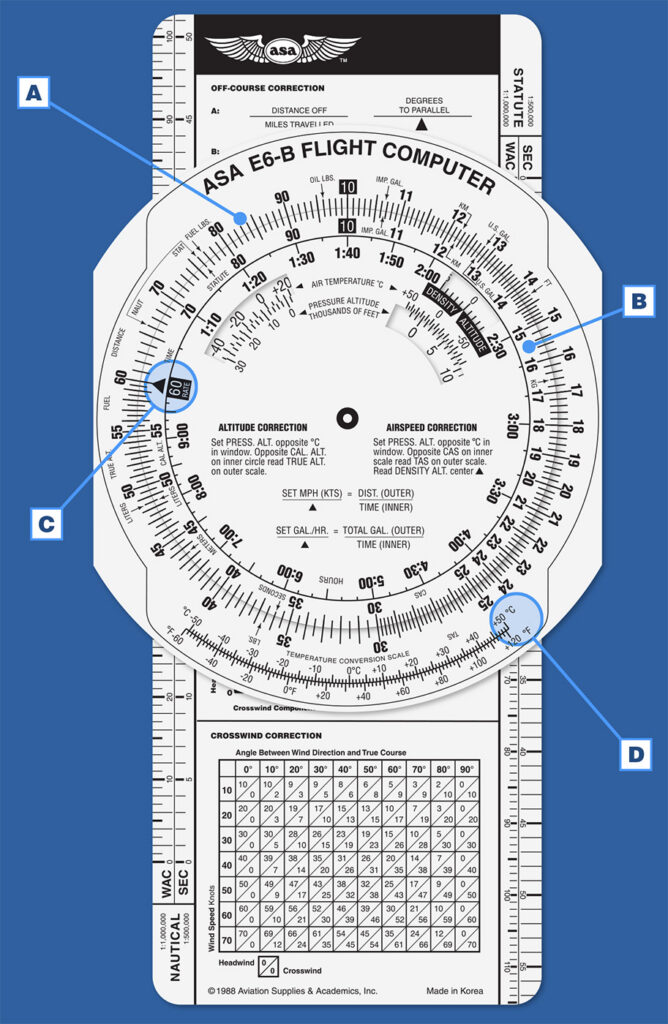
The two circular scales function like a straight slide rule wrapped in a circle. Static printed references include conversion tables (e.g., statute to nautical miles, Celsius to Fahrenheit, volume/weight), pressure altitude formulas, and density altitude correction windows. At first glance the markings can look intricate and intimidating, but with practice, you’ll see how useful this simple tool can be.
Using the E6-B Slide Rule
By rotating the inner disk against the fixed outer scale, you can solve aviation problems like time–speed–distance, fuel consumption, and unit conversions. Looking at the inner disc, first find the 60 minute mark on the outer scale (an arrow and 60 RATE on a colored box). To the left the numbers decrease, first in increments of 5 and then in increments of 1. Inside that is another scale that is marked in hours and minutes (e.g., 70 is 1:10, or 1 hour and 10 minutes).
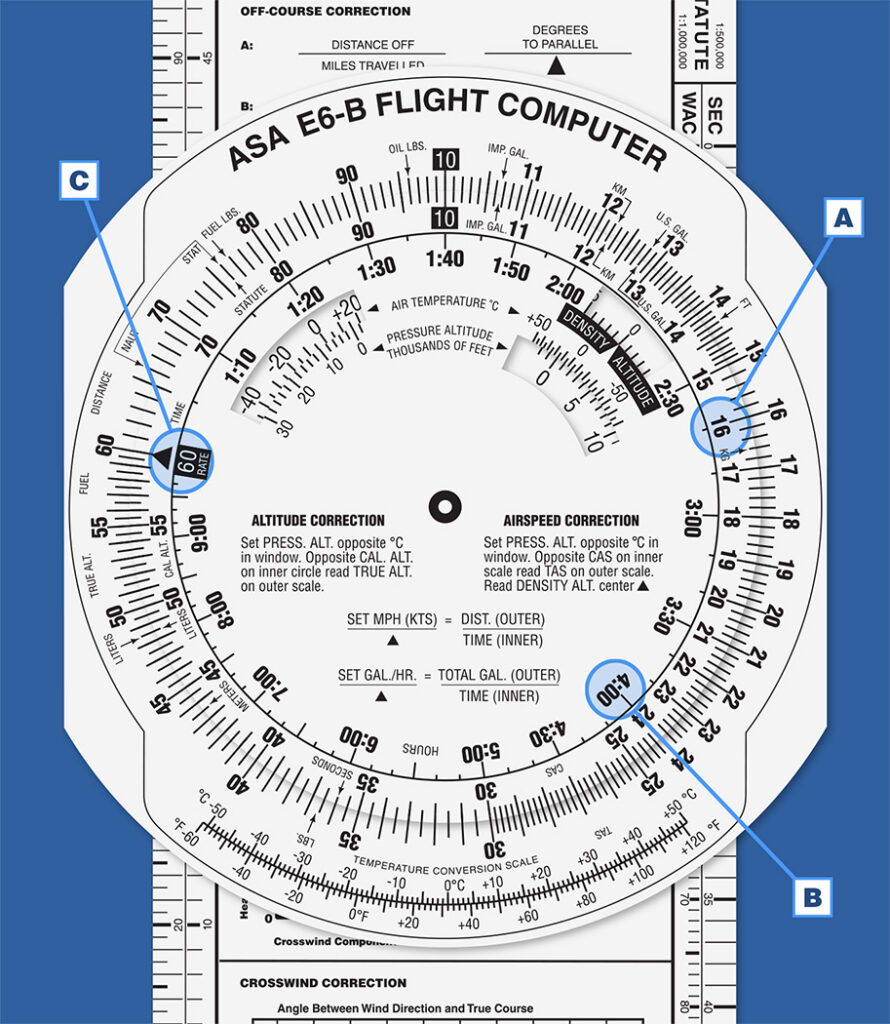
To use the E6-B you need to understand that the scales are logarithmic, which means two important things. First, the calibration spacing changes: between 10 and 11 each mark represents 0.1, between 15 and 16 each mark represents 0.2, at 30 the spacing shifts to 0.5 per mark, and at 60 each mark equals 1. Second, these values scale according to the problem. For example, “10” may represent 0.01, 1, 100, 10,000, or another factor depending on context.
Time–Speed–Distance Calculations
Lets do a time–speed–distance problem. If an aircraft is traveling at 120 knots, how long will it take for it to travel 45 nautical miles (NM)?
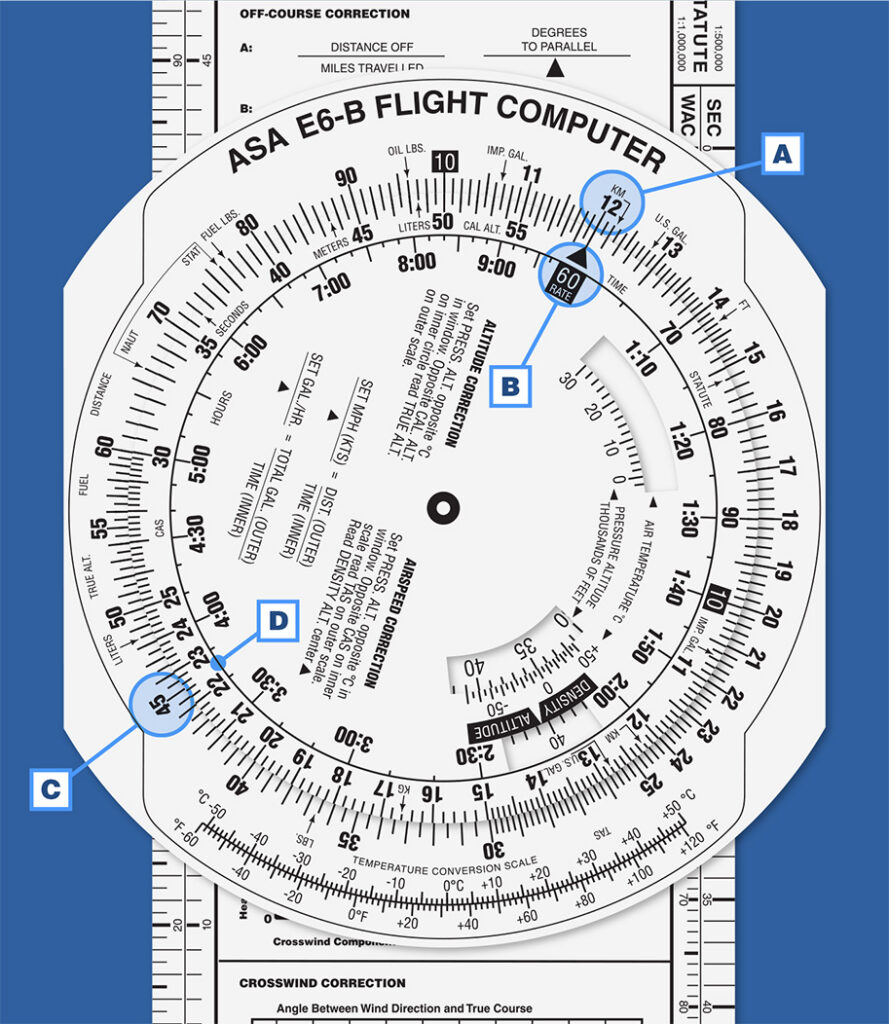
Using an E6-B, set the 60 rate mark to 120 (or 12) on the outer scale; then, opposite 45 on the outer scale, read ~22.5 minutes on the inner scale. Another way to think about this same problem: If 120 knots takes 60 minutes, you align the 120 with 60. Then look at 45 on the same scale to see how long it would take to go that far. At 120 knots it would take you about 22.5 minutes to fly 45 NM.
Here’s a short video on calculating time en route:
Fuel Calculations
Next, let’s do a fuel consumption calculation. If an aircraft burns 8 gallons of fuel per hour (GPH), how much fuel would it burn on a 45-minute trip?
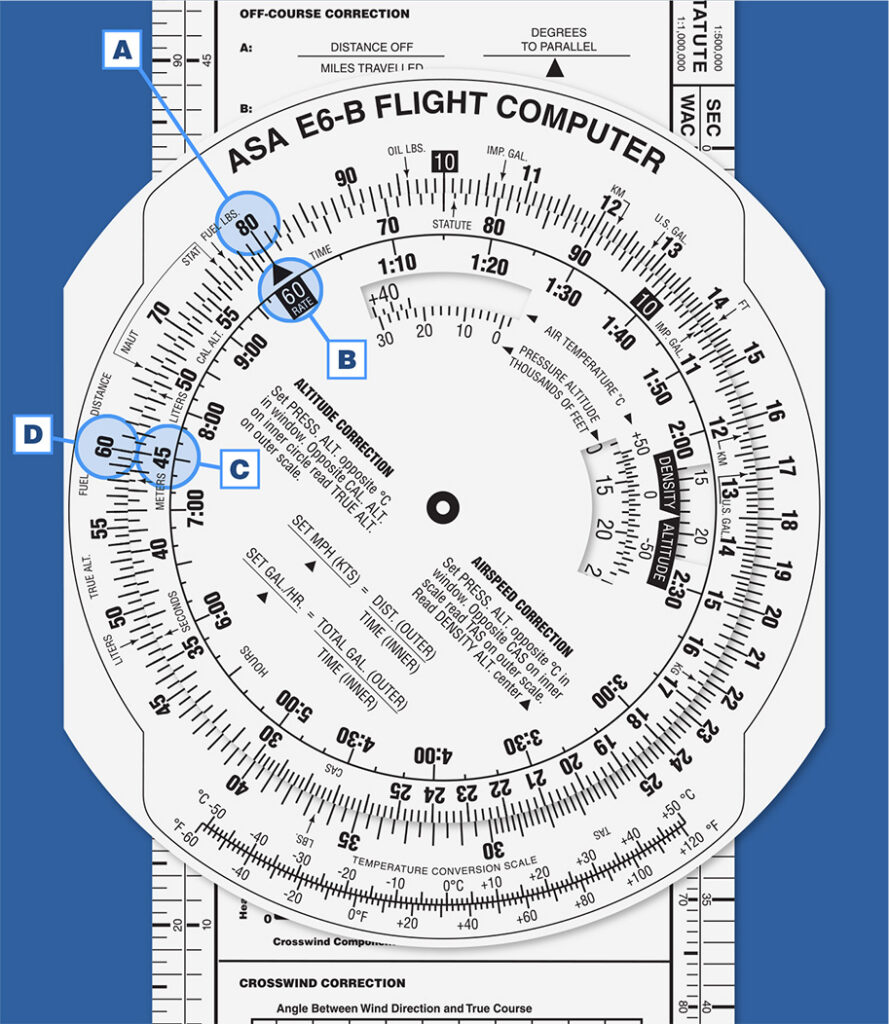
Set 80 (representing 8.0 GPH) on the outer scale opposite 60 (representing minutes) on the inner scale; at 45 minutes on the inner scale, read 60 on the outer scale. Remembering that we use a factor of ten based on context, in this set-up, 60 represents 6.0 gallons of fuel. Over a 45 minute period at 8 GPH you would burn 6 gallons of fuel.
Unit Conversions
The E6-B is labeled with conversion marks. If you look closely you’ll see smaller arrows with different units, like NAUT for nautical mile, KM for kilometers, or LBS. for pounds. You can use these markings to convert from one to the other, e.g., from nautical miles to kilometers, from US gallons to Imperial gallons, or from pounds to kilograms.
Here’s a conversion problem: The distance between two airports is 70 statute miles, how far is that in nautical miles?
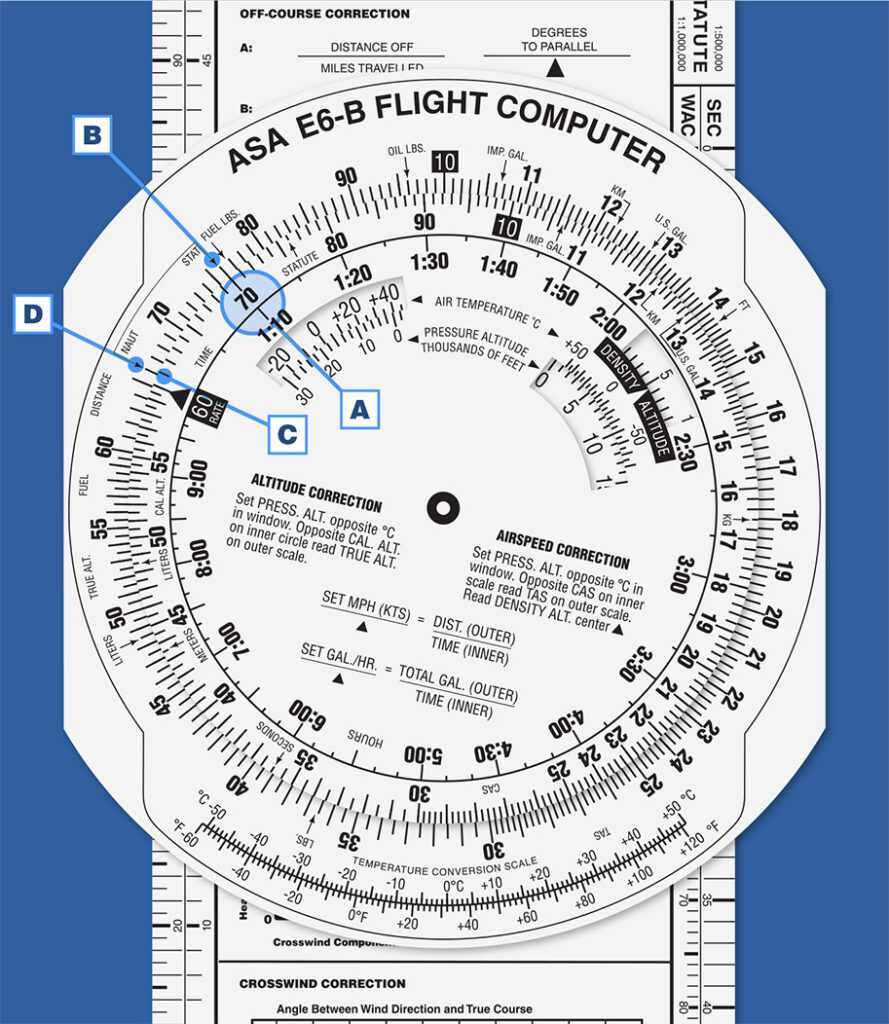
Align 70 with the “STAT” mark; opposite NAUT, read ~61 NM.
These are just a few of the calculations you can do with an E6-B. Click here to order your own ASA E6-B, and find ASA’s E6-B tutorial (a STEM-focused teacher’s guide that includes lesson plans) on our website. Get some practice in, and we’ll cover the wind side in another post, How to Use an E6-B Flight Computer: Part 2 Wind Correction.
feature image by Jacob Lund at stock.adobe.com.