
The Federal Aviation Administration (FAA) is rolling out a new NOTAM system called the NOTAM Management Service (NMS). Most of the changes are happening behind the scenes, but the system still matters any time you check NOTAMs before a flight.
The FAA isn’t changing what NOTAMs are, just the system that delivers them. You’re still getting the same types of information—runway closures, TFRs, lighting issues, and nav aid outages.
The reason for the change is pretty straight forward. The old system was built on aging infrastructure that was getting harder to maintain, and over the past few years it had some very real failures. The nationwide ground stop tied to a NOTAM outage in 2023 made that clear. On top of that, the volume of NOTAMs continues to grow, and the system just wasn’t built to handle that level of demand. So, the FAA worked with commercial vendors to rebuild it.
The NMS is designed to be more reliable, faster at pushing updates, and better able to handle the amount of information moving through the system. From a pilot’s standpoint, the biggest impact is simple, you should have more confidence that the system is up and the information you’re looking at is current. Updates should move faster, especially when things change close to departure time.
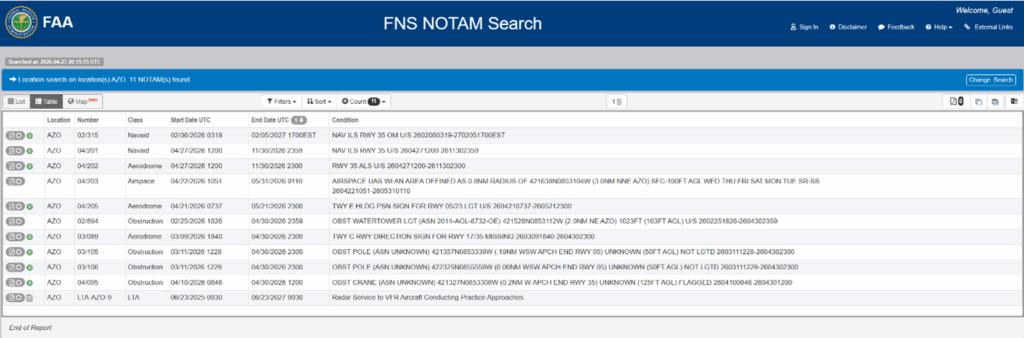
One change you’ll notice is how NOTAMs can be presented. With the new system, NOTAMs can generally be viewed in three formats:
- Domestic format—The traditional US NOTAM style most pilots are used to.
- ICAO format—The international standard format.
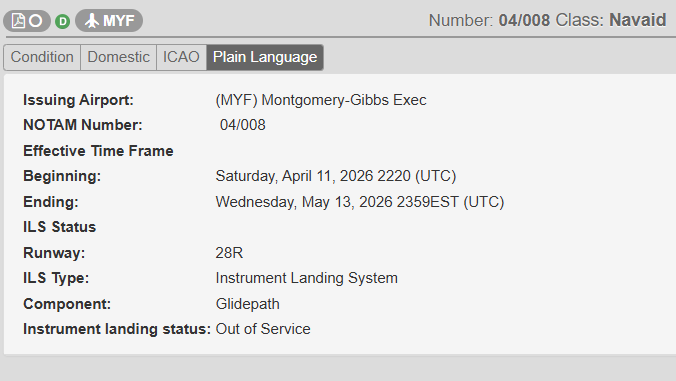
- Plain language—A newer option that presents some NOTAMs in a more direct, readable way.
The plain language option is a step in the right direction, but be aware not everything will show up in that format, and it doesn’t replace understanding what the NOTAM actually means for your flight.
Another feature worth pointing out is the map view (beta) that comes with the new system. This allows you to see certain NOTAMs visually plotted instead of just reading through text. Map view is useful for quickly identifying things like airspace restrictions or location-based impacts, especially when you’re trying to build situational awareness. That said, map view is still in beta and shouldn’t replace a full NOTAM briefing. Think of it as a supplemental tool, not a primary source.
With the new NMS, you’re still going to see abbreviations, condensed wording, and a lot of information that may or may not apply to your flight. The system delivering the information is better. Interpreting it is still on you.
For students, the NMS doesn’t change your responsibility. You still need to check NOTAMs before every flight and start understanding what they actually mean not just scanning them. The plain language option and map view can help, but they’re tools—not shortcuts.
For more experienced pilots, the update is mostly a reliability improvement with some usability improvements mixed in. The data is more dependable, and you now have more flexibility in how you view it, but you still need to decide what actually affects your route, your airport, and your operation.
For instructors, the NMS offers a good opportunity to adjust how NOTAMs are taught. Students should be exposed to all three formats and shown how to use tools like the map view without relying on them. All users need to be able to interpret the raw information.
The FAA’s new NOTAM system is a solid and necessary upgrade. It fixes real issues with reliability and starts to move things in a better direction. But from a pilot standpoint, nothing fundamental is changing. You still must take the information, interpret it, and apply it to your flight—that’s the part that actually matters.
Featured image by Leah Newhouse from pexels.com.